SUBDERMAL IMPLANTS
テーマTHEME
相談するCONSULT
製品PRODUCTS
ガイドGUIDE
会社情報COMPANY
アプリ / Spark ActionsAPP / SPARK ACTIONS

Sparkが何をするかは、アプリで決めるWhat your Spark does, you set from your phone

Spark Actionsは、Sparkを使うためのアプリです。Sparkを読み取り、保存したアクションやデジタルカードを管理して、今使いたい一つをNFCでSparkに書き込めます。ウェブサイト、電話、メール、SMS、デジタルカード、SupportNetを、ひとつのアプリで。iPhoneとAndroidで無料です。Spark Actions is the app for a Spark implant. It reads the Spark, keeps a library of saved actions and Digital Cards, and writes the one you want back to the implant over NFC. Websites, calls, email, SMS, Digital Cards and SupportNet, in one place. Free, on iPhone and Android.

価格PRICE 無料Free対応OSPLATFORM iOS / Android表示言語LANGUAGES 日本語 / 英語Japanese / English対応製品FOR Spark 2

できることWHAT IT DOES

Spark 2についてABOUT SPARK 2 →

アクションとは、相手が対応スマートフォンをSparkにかざしたときに、その相手の画面で起きることです。いくつでも保存しておき、その日に合う一つを選んでインプラントへ書き戻します。インプラントに残るのは、そのとき選んだ一つだけです。An action is what happens on the other person's phone when they hold it to your Spark. Save several, keep them in the app, and write whichever one suits the day back to the implant. Nothing is stored on the implant except the item you chose to put there.

ウェブサイトWebsite

任意のURLを設定できます。プロフィールページ、お店、フォームなど。対応するウェブアクションでは、開くまでの遅延も設定できます。Any URL: a profile page, a shop, a form. Supported website actions can also wait a moment before opening.

電話・メール・SMSCall, email, SMS

電話をかけるアクション、件名と本文を入れておくメール、本文まで用意したSMSを保存できます。A phone action, an email with the subject and body already filled in, or an SMS with the message ready to send.

デジタルカードDigital Cards

写真、氏名、役職、会社名、メモ、複数の連絡先を1枚にまとめた連絡先ページです。相手はそのまま自分の連絡先に取り込めます。A contact page with a photo, name, role, company, a note and several contact fields, which the other person can import straight into their address book.

保存ライブラリA saved library

仕事用のカードと私用のカード、お店のリンクとポートフォリオのリンク。いくつでも持っておいて、好きなときに切り替えられます。Keep a work card and a private card, a shop link and a portfolio link, and switch between them whenever you like.

回数と最終確認Scan count and last seen

条件が揃う場合、今Sparkに設定している項目について、読み取られた回数と最後に確認された時刻を表示できます。Where the data is available, the item currently on your Spark shows how many times it has been read and when it was last seen.

SupportNetSupportNet

Spark 2向けのチェックイン機能。読み取った相手からの短い匿名メッセージと、任意で相手の端末からの1回限りの位置情報を受け取れます。A Spark 2 check-in feature: a short anonymous note from whoever scans the implant, and optionally a one-time location from their own phone.

SupportNetとはWhat SupportNet is →

アプリの画面THE APP

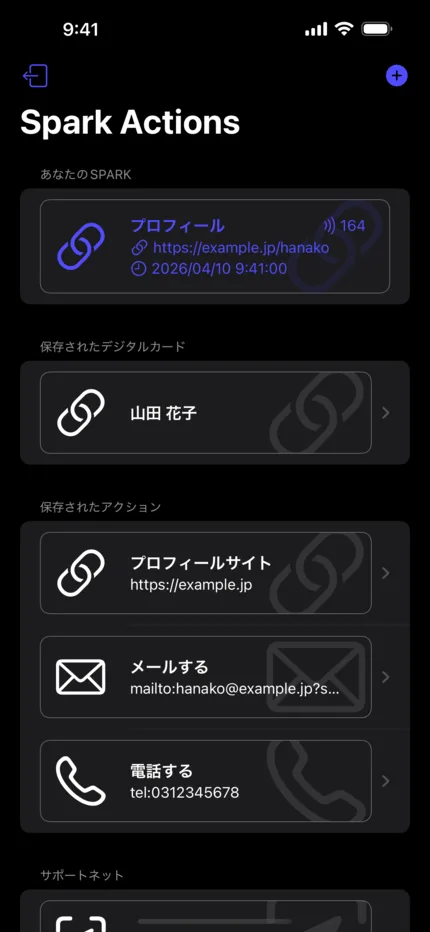
Spark Actionsのホーム画面。今Sparkに設定している項目と、その読み取り回数と最終確認時刻。その下に保存済みのデジタルカード、アクション、サポートネット。

ひとつのリストにEverything in one list

画面の一番上は、今Sparkに入っているもの。その下はすべて保存済みで、いつでも入れ替えられます。The top of the screen is whatever is on your Spark right now. Everything below it is saved and ready to swap in.

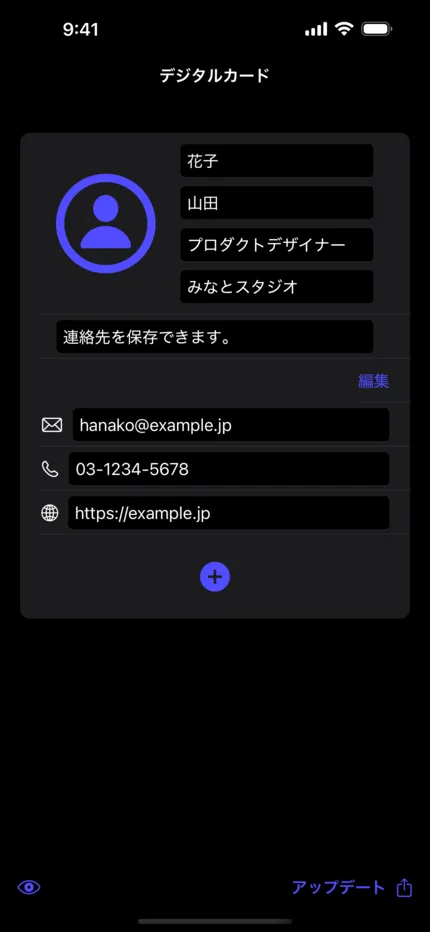
Spark Actionsのデジタルカード編集画面。写真、氏名、役職、会社名、連絡先の入力欄。

書き直せる名刺A card you can rewrite

役職や電話番号はアプリ側で直せます。次に読み取った人には、新しい内容が届きます。刷り直すものは何もありません。Change a job title or a phone number in the app, and the next person to scan gets the new one. Nothing has to be reprinted.

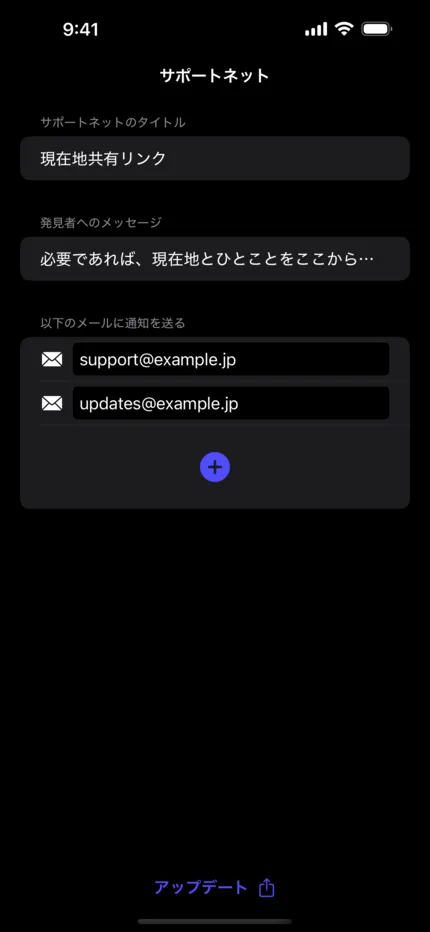
Spark Actionsのサポートネット編集画面。タイトル、発見者へのメッセージ、通知先メールアドレスの入力欄。

SupportNetの設定SupportNet, set once

タイトル、読み取った人へ向けた短いメッセージ、通知を受け取るメールアドレス。設定はこれだけです。A title, a short message for whoever scans, and the email addresses that should receive it. That is the whole setup.

SupportNetとはSUPPORTNET

SupportNetは、Spark Actionsで設定するSpark 2向けの機能です。読み取った相手がリンクを開くと、短い匿名メッセージを送れます。相手が望み、その端末とブラウザが許可した場合にかぎり、相手の端末の位置情報を1回だけ添えられます。インプラント自体にGPSはなく、単独で何かを送ることもありません。SupportNet is a Spark 2 feature you configure in Spark Actions. When someone scans the implant and opens the link, they can send you a short anonymous note. If they choose to, and if their own phone and browser allow it, they can attach location information from that phone, one time. The implant has no GPS and sends nothing on its own.

位置情報はインプラントではなく、相手の端末からThe location comes from the other person's phone, not from the implant

SupportNetの通知に位置情報が付く場合、それは読み取った相手のスマートフォンから、そのブラウザで、本人が共有に同意したうえで、そのメッセージ1回かぎり読み取られたものです。インプラントはパッシブ型で、位置を持たず、履歴も残さず、自分から送信する電源もありません。If a SupportNet notification carries a location, that location was read from the phone of the person who scanned you, in their browser, after they agreed to share it, and only for that one message. The implant is passive: it holds no position, keeps no history, and has no battery to send anything.
  1. 01設定Set upSpark Actionsで、タイトル、読み取った人へのメッセージ、通知先のメールアドレスを設定し、Sparkへ書き込みます。In Spark Actions, enter a title, a short message for whoever scans, and the email addresses that should be notified. Then write it to the Spark.
  2. 02読み取りScan対応スマートフォンをインプラントにかざした相手が、自分の端末でSupportNetのページを開きます。A person holding a compatible smartphone to the implant reaches the SupportNet page on their own device.
  3. 03メッセージNote自分の氏名や連絡先を入力しなくても、短いメッセージを送れます。相手側に必須の入力はありません。They can send a short message without giving their own name or contact details. Nothing about them is required.
  4. 04位置情報Location相手の端末とブラウザが許可し、本人が同意した場合にかぎり、その端末の位置情報が1回分だけメッセージに添えられます。継続的な送信ではありません。Only if their phone and browser permit it and they agree: one location reading from their device travels with the message. One reading, not a feed.

所有者が設定する情報What you configure

  • SupportNetのタイトルA title for the SupportNet item
  • 読み取った人に表示される短いメッセージA short message shown to whoever scans
  • 通知を受け取るメールアドレスThe email addresses that receive the notification

読み取った相手が送れる情報What the other person can send

  • 短いメッセージ(匿名で)A short message, anonymously
  • 任意で、自分の端末から1回分の位置情報Optionally, one location reading from their own phone
  • 氏名や連絡先の入力は必須ではありませんTheir name and contact details are never required

届き方How it reaches you

  • メッセージはSupportNetのサービスを経由し、設定したアドレスへ届きますThe message goes through the SupportNet service and on to the addresses you set
  • 一方向の通知で、チャットではありませんIt is a one-way notification, not a chat
  • 読み取った相手へ返信する手段はありませんThere is no way to reply to the person who scanned

ご利用前に知っておきたいことBefore you rely on it

  • 見知らぬ相手が、自分の端末をあなたの手にかざしてくれる必要がありますA stranger has to be willing to hold their phone to your hand
  • マイクロチップインプラントを知らない人、読み取り方が分からない人は少なくありませんMany people do not know what a microchip implant is, or how to read one
  • 助けが必要な本人から、まず声をかける必要がある場合がありますThe person who needs help may have to ask for it first
  • 相手が、自分の端末でリンクを開くことに同意する必要がありますThey must agree to open a link on their own device
  • 位置情報の共有は、拒否されることも、端末やブラウザの設定で使えないことも、失敗することもありますLocation sharing can be declined, blocked by settings, or simply fail

SupportNetではないものWhat SupportNet is not

  • 緊急通報サービスではなく、その代わりにもなりませんNot an emergency service, and not a substitute for calling one
  • 常時追跡や見守りの仕組みではありませんNot continuous tracking and not a monitoring service
  • 発見や救援を保証するものではありませんNot a guarantee that anyone will be found or helped
  • インプラント単独では成立しません。人と、端末と、リンクが必要ですNot readable by the implant alone: it always takes a person, a phone and a link

作られた理由Why it was built

パッシブ型のインプラントとシンプルなNFCという制約の中で、迷っている人のために少しでもできることはあるか。SupportNetは、その問いから生まれた機能です。警察庁の資料では、2024年の行方不明者届受理数は82,563人で、2020年の77,022人から2023年の90,144人へ増えたあとも、依然として高い水準とされています。SupportNetは、小さな任意の手段としてご用意しているもので、結果をお約束するものではありません。警察庁 令和6年における行方不明者届受理等の状況(PDF)Within the limits of a passive implant and plain NFC, could there still be some small way to help someone who is lost? That was the question behind SupportNet. Japan's National Police Agency recorded 82,563 missing-person reports in 2024, still a high level after rising from 77,022 in 2020 to 90,144 in 2023. SupportNet is offered as one small, optional bridge, and it promises no outcome. National Police Agency, missing-person reports in 2024 (PDF)

自分あての1回限りの位置メモとしても使えますIt also works as a one-time location note to yourself

自分でSparkを読み取り、その時点の場所を自分あてに1回だけ残すこともできます。旅先の一箇所、また来たい場所など。いずれも自分で操作して1回残すもので、自動で動くものではありません。You can scan your own Spark and send yourself a location entry for that moment: a stop on a trip, a place you want to find again. It is a deliberate, manual action each time, never a background one.

アプリを入手GET THE APP

Spark ActionsSpark Actions

iPhoneとAndroidで無料。日本語と英語に対応しています。読み取る対象としてSparkインプラントが必要です。提供はVivoKey Technologiesです。Free on iPhone and Android, in Japanese and English. You need a Spark implant for the app to have anything to read; the app is published by VivoKey Technologies.

  • iOS 17以降iOS 17 or later
  • SupportNetはSpark 2向けの機能ですSupportNet is a Spark 2 feature

Spark 2 本体Spark 2, the implant itself

アプリにはSparkが必要です。Spark 2はVivoKey Japanが国内でご案内している認証インプラントで、¥26,620(税込)。提携医師がインストールします。The app needs a Spark. Spark 2 is the authentication implant sold in Japan by VivoKey Japan, ¥26,620 incl. tax, installed by a partner physician.

Spark 2を見るSee Spark 2 →