SUBDERMAL IMPLANTS
テーマTHEME
相談するCONSULT
製品PRODUCTS
ガイドGUIDE
会社情報COMPANY
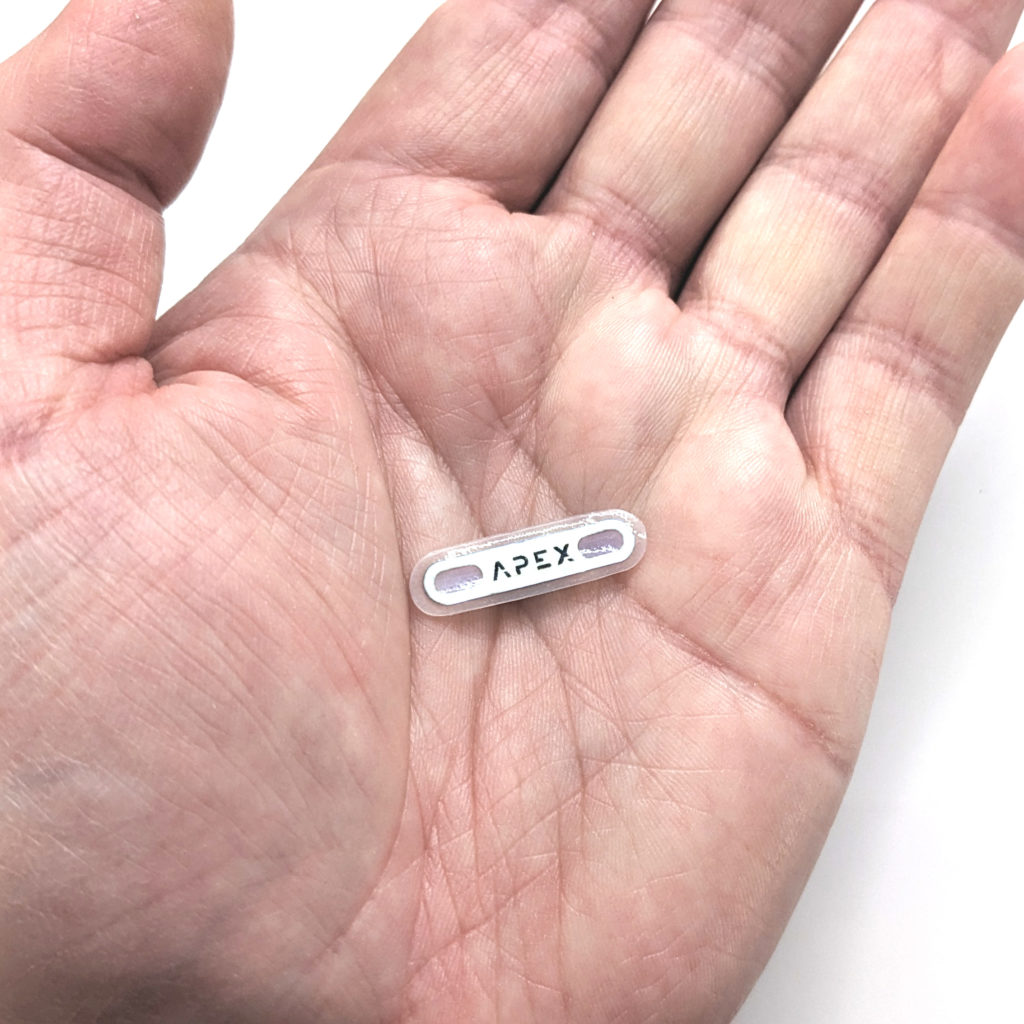
手のひらに載せたフレックス型のApex
ガイド / パスキーGUIDE / PASSKEYS

パスキーとセキュリティキー:Apexで実際に試した結果Passkeys and security keys: what we tried on Apex

パスキーとセキュリティキーの関係と、Apexで確認した結果を紹介します。How passkeys and security keys fit together, plus what we tested with Apex.

規格STANDARDFIDO2試験した製品TESTED WITHApex確認日TESTED ON2026-10-27

言葉の関係How the words relate

サービスService

サービスは、公開鍵、つまり人に渡してもよい鍵と、その識別番号を保存します。Keeps the public key and an ID for it.

サイトとブラウザのやりとりThe site and the browser talk

ブラウザBrowser

どのサイトからの要求かを鍵に伝え、その場かぎりの確認データを渡します。Tells the key which site is asking, and passes along a one-time check.

どのサイトかを確認して、鍵に渡すChecks which site, then asks the key

鍵(認証器)Key (authenticator)

スマートフォン、USBキー、手の中のチップ。秘密鍵で、本人であることを示します。A phone, a USB key, or a chip in a hand. It uses the private key to prove it is you.

言葉の定義Definitions

FIDO2:共通の規格 FIDO2は、パスワードを使わずにログインするための国際規格です。ウェブサイトとブラウザの間の決まりをWebAuthn、ブラウザと鍵の間の決まりをCTAPといいます。FIDO2: the standard FIDO2 is an international standard for signing in without a password. The website-to-browser rules are called WebAuthn. The browser-to-key rules are called CTAP.

パスキー:資格情報 パスキーは、パスワードを使わずにログインするための鍵です。端末どうしで同期するものもあれば、ひとつの認証器にだけ保存されるものもあります。FIDO2対応のセキュリティキーに保存できるパスキーもあります。Passkey: the credential A passkey is a credential for signing in without a password. Some passkeys sync between devices. Others stay on one specific authenticator. Some FIDO2 security keys can store passkeys too.

セキュリティキー:認証器のひとつ 鍵を持ち、本人確認に使う機器を認証器といいます。スマートフォンやパソコンが認証器になることもあります。別の認証器として使うものがセキュリティキーです。USBやNFCで使うものもあれば、皮下に入れて使うものもあります。Security key: one kind of authenticator An authenticator is the device that holds the key and proves you are present. Your phone or computer can be one. A separate authenticator is called a security key. It may connect by USB or NFC, or be carried under the skin.

同期型と端末固定型 同期型のパスキーは、対応する管理サービスを使って、ほかの端末でも利用できます。端末固定型は、ひとつの認証器に保存されたままです。違いは、同期のしやすさと、秘密鍵をどこで保存・管理するかです。向いている方式は、使い方と管理の考え方によって変わります。Synced or device-bound A synced passkey can work on other devices through a compatible passkey provider. A device-bound credential stays on one authenticator. The two differ in how convenient syncing is and where the private key is stored and managed. The right choice depends on how you use and manage your keys.

サービス サービスは、公開鍵、つまり人に渡してもよい鍵と、その識別番号を保存します。ログインのたびに、チャレンジと呼ばれる新しい確認用データを送ります。Service The service stores the public key, the part of the key pair that can be shared, and an ID for it. Each time you sign in, it sends a new one-time check called a challenge.

ブラウザ ブラウザは、どのサイトからの要求かを鍵に伝え、確認用データを渡します。鍵はRP ID、つまりサービスを見分ける名前で登録先を覚えています。要求元のサイトが合わなければ、署名しません。Browser The browser tells the key which site is asking and passes along the check. The key keeps track of each service with an RP ID, the service's identifying name. It will not sign if the requesting site does not match.

鍵(認証器) 鍵は秘密鍵で署名します。署名は、その秘密鍵を持つ鍵だけが作れます。端末固定型では、秘密鍵を外に出さずに認証できます。Key (authenticator) The key uses its private key to sign. That signature can be made only with the private key. A device-bound key can authenticate without exporting the private key.

Apexで試した結果What we tried on Apex

以下は2026年10月27日に当社で確認した結果です。行をタップすると確認した環境が開きます。The results below are from our checks on October 27, 2026. Tap a row to see the setup.

Google キーに暗証番号(PIN)があればパスワードなし。なければ2段階のみ。Passwordless with a PIN set on the key. Without one, 2-step only. パスキー可Passkey works
パスキー(パスワードなし)Passkey (no password)

チップにFIDO PIN(暗証番号)があると、パスキーとして登録でき、パスワードなしでサインインできました。PINがない場合、Googleでは2段階認証のキーとしてのみ登録されました。With a FIDO PIN (a code) set on the chip, it registered as a passkey and we signed in without a password. Without a PIN, Google registered it only as a key for 2-step verification.

環境Setup
MaciPhoneWindows

Mac(Safari)とACR1252U、iPhone(Safari、メールアプリ)のNFC、Windows 11(Edge)とACR1252UMac (Safari) with the ACR1252U; iPhone (Safari, and the Mail app) by NFC; Windows 11 (Edge) with the ACR1252U

Amazon.co.jp 2回目以降はパスキーだけでサインイン。Passkey alone from the second sign-in. パスキー可Passkey works
パスキー(パスワードなし)Passkey (no password)

初回のサインインでは、追加のコード確認がありました。2回目以降は、パスキーだけでサインインできました。画面には顔、指紋、端末のPINだけが説明され、外部キーは「その他」と表示されました。We signed in with the passkey alone. The first sign-in had an extra code check. From the second time on, we could sign in with the passkey alone. The page describes face, fingerprint or device PIN only, and lists the key as "Other".

環境Setup
Mac

MacのSafari、ACR1252UMac Safari with the ACR1252U

Microsoft Macで登録し、Windowsで使用。Registered on a Mac and used on Windows. パスキー可Passkey works
パスキー(パスワードなし)Passkey (no password)

Macで登録しました。Windowsでは、セキュリティキーを選び、かざしてキーのPINを入力するとサインインできました。We registered on the Mac and signed in on Windows by choosing the security key, tapping, and entering the key's PIN.

環境Setup
MacWindows

登録はMac、サインインはWindows 11とACR1252UMac to register; Windows 11 with the ACR1252U to sign in

X パスワードの後にキー。A key after the password. 2段階のみ2-step only
2段階認証のキー(パスワード入力後)Key for 2-step sign-in (after the password)

パスキーではなく、2段階認証用のセキュリティキーとして登録されました。パスキーとしては扱われませんでした。iPhoneで登録するときはPINを求められませんでした。サインインでは、パスワードの後にキーとPINを求められました。It registered under two-factor authentication, not under passkeys, and was never treated as a passkey. On the iPhone, registration did not ask for the PIN. Sign-in asked for the password, then the key and the PIN.

環境Setup
iPhoneMac

iPhoneのNFC、Mac(Safari)とACR1252U(リーダーを正常に動くUSBポートに挿したとき)iPhone by NFC; Mac (Safari) with the ACR1252U, once the reader was on a USB port that worked

Facebook パスワードの後にキー。A key after the password. 2段階のみ2-step only
2段階認証のキー(パスワード入力後)Key for 2-step sign-in (after the password)

「セキュリティキーを使用」から登録できました。プライベートウインドウでサインインすると、メールアドレスとパスワードの後に、キーとPINを求められました。Facebookがすでに認識しているブラウザでは、2段階目は省かれました。We registered it with "Use security key". Signing in from a private window asked for email and password, then the key and the PIN. A browser that Facebook already knew skipped the second step.

環境Setup
Mac

Mac(Safari)とACR1252U。サインインはプライベートウインドウで確認Mac (Safari) with the ACR1252U; sign-in checked in a private window

楽天ID 外部セキュリティキーの選択肢は表示されなかった。No external security key option was shown. 外部キー表示なしNo external key option
外部キーの選択肢なしNo external key option

当社が確認したMacとiPhoneのSafariでは、外部セキュリティキーを選ぶ項目は表示されませんでした。In Safari on the Mac and iPhone we checked, no option for an external security key was shown.

環境Setup
MaciPhone

Mac(Safari)、iPhone(Safari)Mac (Safari); iPhone (Safari)

メルカリ 外部セキュリティキーの選択肢は表示されなかった。No external security key option was shown. 外部キー表示なしNo external key option
外部キーの選択肢なしNo external key option

当社が確認したMacとiPhoneのSafariでは、外部セキュリティキーを選ぶ項目は表示されませんでした。In Safari on the Mac and iPhone we checked, no option for an external security key was shown.

環境Setup
MaciPhone

Mac(Safari)、iPhone(Safari)Mac (Safari); iPhone (Safari)

Instagram 使えたのは認証アプリの機能だけ。Only the authenticator app function was available. 認証アプリのみAuthenticator app only
FIDO以外Not FIDO

Apexで使えたのは、認証アプリの機能であるOTP(ワンタイムパスワード)を、2段階認証の認証アプリとして使う方法だけでした。確認したアカウントには、セキュリティキーやパスキーの項目は表示されませんでした。Metaは2026年4月にInstagramのパスキー対応を発表していますが、そのアカウントでは表示されませんでした。The Apex worked only through its authentication app function (OTP, one-time passwords), as the app for 2-step sign-in. The account we checked showed no security key or passkey option. Meta announced passkey support for Instagram in April 2026, but it did not appear on that account.

環境Setup
Web

確認したアカウントのウェブ版アカウントセンターThe web Accounts Center, on the account we checked

Yahoo! JAPAN ID アカウント作成と復旧が途中で止まった。Account creation and recovery stopped partway. 未確認Not verified
未確認Not verified

アカウント作成と復旧の手続きが途中で止まり、理由は表示されませんでした。そのため、パスキーについての結果はありません。Account creation and recovery stopped partway, and no reason was shown, so we have no passkey result.

環境Setup
MaciPhone

Mac、iPhoneMac; iPhone

LINE 外部キーを登録する手順は公開されていない。No published way to register an external key. 試験なしNot tested
未確認Not verified

スマートフォンの生体認証でサインインする方式です。外部キーを登録する手順は公開されていません。当社では試験していません。It signs in with the phone's biometric authentication. There is no published way to register an external key. We did not test it.

環境Setup

試験なしNot tested

確認した環境How we tested

FIDO2アプレットを新たに導入したApexの試験機を使いました。MacとWindowsのパソコンではACS ACR1252UのNFCリーダーを使い、iPhoneでは内蔵のNFCを使いました。FIDO PIN、つまりキーに設定する暗証番号がある試験機と、ない試験機の両方を使いました。表は、その日、その環境で確認できたことです。We used Apex test units with freshly installed FIDO2 applets. We used an ACS ACR1252U NFC reader with a Mac and Windows PC, and the iPhone's built-in NFC. Some test units had a FIDO PIN, a code set on the key, and others did not. The table reports what we saw that day in that setup.

この結果が示さないことWhat these results do not establish

ここに書いたのは、ある1日、ある環境、そのときのアカウントで確認したことです。他のブラウザ、OS、アカウントでの動きや、サービスの仕様変更後の動きは示していません。皮下にインストールした状態での確認でもありません。サービスがApexを受け付けることを約束するものでもありません。These results describe one day, one setup, and the account as it was then. They do not establish what will happen in other browsers, operating systems, or accounts, or after a service changes. They do not test the chip after installation under the skin. They do not promise that a service will accept Apex.

当社の確認で分かったことPractical points from our check

パスキーに名前を付けるName each passkey

詳細Details

Amazon.co.jpでは、外部キーは「その他」とだけ表示され、名前は20文字まででした。「Apex 右手」のように何のキーか分かる短い名前にすると、あとで見分けやすくなります。Amazon.co.jp showed the external key only as "Other" and limited names to 20 characters. A short name that says what it is, such as "Apex right hand", makes your keys easier to tell apart later.

予備の認証手段を登録するRegister a backup way in

詳細Details

Apexを主なログイン手段にする前に、スマートフォンのパスキーや別のセキュリティキーなど、予備のログイン手段も登録しておくことをおすすめします。認証器がひとつだけだと、なくしたときにログインできなくなることがあります。Before using Apex as your main sign-in method, register a backup way in, such as a passkey on your phone or another security key. If you have only one authenticator, losing it can lock you out.

2段階認証は、サービスが認識していないブラウザで試すTest 2-step sign-in in a browser the service does not recognize

詳細Details

Facebookは、すでに認識しているブラウザでは2段階目を省きました。キーが実際に使われるかを確かめるには、プライベートウインドウや別のブラウザで試してください。Facebook skipped the second step in a browser it already recognized. To see whether the key is actually used, try a private window or a new browser.

「このデバイスでのみ」はキー自身を指すことがある"Only on this device" can mean the key itself

詳細Details

Microsoftは、登録したパスキーを「このデバイスでのみ使用できます」と表示しました。セキュリティキーの場合、この「デバイス」はキー自身を指します。Macで登録した同じキーで、Windowsのパソコンにサインインできました。Microsoft said the passkey could be used only on the device where it was created. With a security key, that device is the key itself. We registered it on a Mac and used the same key to sign in on a Windows PC.

フィッシングに強い理由Why it resists phishing

本物のサイトには署名し、よく似た別のドメインには署名しない / Signs for the real site, refuses the look-alike domain 左のカプセル型のキーから、右上の本物のサイトへは点線の矢印が届き、右下のよく似た別のドメインへは、赤い×の手前で止まります。 From the capsule key on the left, a dotted arrow reaches the real site at the top right, and a dotted line stops at a red cross before the look-alike domain at the bottom right. 本物のサイトReal site 署名するSigns よく似た別のドメインLook-alike domain 署名しないRefuses

本物のサイト用に作った資格情報は、よく似た別のドメインには署名しません。A credential for the real site will not sign for a look-alike domain.

  • サービスは秘密を持たないThe service holds no secret
  • 毎回ちがう確認データA new check every time
  • サイトのドメインを確認The site's domain is checked
  • その場にいる本人の操作You are there
詳細Details

サービスは秘密を持たない サービスが保存するのは、公開鍵、つまり人に渡してもよい鍵と、その識別番号などです。公開鍵だけを手に入れても、秘密鍵の持ち主としてログインすることはできません。秘密鍵を偽のサイトに入力することもありません。The service holds no secret The service stores the public key and an ID for it. Having the public key alone does not let someone sign in as if they had the private key. You also never type the private key into a fake site.

毎回ちがう確認データ ログインのたびに、チャレンジと呼ばれる新しい確認用データに署名します。その応答を記録しても、あとで使い回すことはできません。A new check every time Each sign-in uses a new one-time check, called a challenge. A recorded response cannot be reused later.

サイトのドメインを確認 ブラウザは、どのドメインからの要求かを鍵に伝えます。本物のサイト用に作ったパスキーは、よく似た別のドメインには署名しません。これが、フィッシングに強い主な理由です。The site's domain is checked The browser tells the key which domain is asking. A credential for the real site will not sign for a look-alike domain. This is the main reason passkeys resist phishing.

その場にいる本人の操作 ログインのたびに、本人がその場で操作する必要があります。鍵によっては、タッチ操作や、自分で設定した暗証番号(PIN)の入力も必要です。You are there Each sign-in requires you to be present. Depending on the key, it may also require a touch or a PIN, a code you set.

この強さの理由What provides this protection

この強さは、サイトのドメインを確認する仕組みによるものです。鍵がスマートフォンでも、外付けのセキュリティキーでも、皮下のApexでも、この仕組みは同じです。皮下に入っていること自体で、フィッシングへの強さが増すわけではありません。強いことと、被害を完全になくせることは別です。防げないことを次の節にまとめます。This protection comes from checking the domain. It is built into the design and works the same whether the key is a phone, an external security key, or an Apex under the skin. An implanted key is not more resistant to phishing just because it is implanted. Resistance is not the same as complete protection. The next section lists what this does not stop.

防げないことWhat it does not stop

  • 端末のマルウェアや、乗っ取られたブラウザMalware on your device, or a browser that has been taken over
  • ログイン後に、ログイン状態を保つ情報(Cookie)を盗まれることTheft of a session cookie, the data that keeps you signed in, after sign-in
  • SMSやメールを使うアカウント復旧Account recovery that falls back to SMS or email
  • キーを登録しても、パスワードでログインできるサービスServices that still allow password sign-in alongside the key
  • 登録した認証器がひとつだけで、それをなくすことLosing the only authenticator you registered

予備を登録するRegister a backup

ひとつの手段に頼る前に、スマートフォンのパスキーや2本目のキーなど、別のログイン方法も登録してください。Apexでは、パスキーの機能であるFIDOアプレットを更新すると、中に保存したパスキーが消えるため、とくに大切です。Before relying on one method, register another way to sign in, such as a passkey on your phone or a second key. This is especially important for Apex because updating its passkey function, the FIDO applet, deletes the passkeys stored on it.

Apexの位置づけWhere Apex fits

Apexは、NFCで使う端末固定型のセキュリティキーです。皮下にインストールして使います。皮下に入れること自体で、FIDO2のフィッシング耐性が高まるわけではありません。違いは形です。別の機器として持ち歩かずに使えます。ひとつのチップには、対応する複数のアプレット、つまりチップの中で動く小さなプログラムを導入できます。Apex is a device-bound security key that uses NFC and is carried under the skin. Putting it under the skin does not by itself increase FIDO2's phishing resistance. The difference is its form. You do not carry a separate device, and one chip can hold several compatible applets, small programs that run inside it.

使える場面Where it can work

詳細Details

FIDO2のセキュリティキーに対応したサービスで使えます。たとえばGoogleアカウントです。Googleのヘルプには、iOS 13.3以降のiPhoneでNFCセキュリティキーが使えるとあります。当社のMacとWindowsでの確認では、USB接続のNFCリーダーを使いました。対応はサービスごとに異なるため、お使いのサービスで確認してください。下に当社の結果を載せています。It can work with services that accept FIDO2 security keys, such as Google accounts. Google's help page says NFC security keys work on iPhone with iOS 13.3 or later. In our Mac and Windows checks, we used a USB NFC reader. Services handle this differently, so check the service you use. Our results are below.

できないことと制約Limits

詳細Details

Appleアカウントのセキュリティキーには使えません。Appleアカウントで使うには、FIDO認定を受けたキーが必要です(Appleのサポート情報)。Fidesmoの説明では、ApexのFIDOアプレットはテストに合格していますが、認定は受けていません。NFC専用で、USBに差し込むキーではありません。当社の試験機のFIDO2アプレットが報告した署名方式(アルゴリズム)は、es256のみでした。FIDOアプレットを更新すると、中のパスキーはすべて消えます。It cannot be used as an Apple Account security key. Apple requires FIDO Certified keys for that use (Apple Support). Fidesmo says the Apex FIDO applet has passed the test suites but is not certified. It uses NFC only, so it is not a USB key that plugs in. The FIDO2 applet on our test units reported es256 as its only signature algorithm. Updating the FIDO applet deletes every passkey on it.

保存できる数How many passkeys fit

詳細Details

当社の確認では、保存できるパスキーの数は、同じチップにあるほかのアプレットが使う容量で変わりました。試験機では、FIDO2だけなら約80、PGP、HMAC、OTPなどチップのほかの機能も導入した状態では約10でした。数は、チップに何を導入しているかで変わります。In our checks, the number of passkeys the chip could store depended on how much memory other applets on the same chip used. Our test units held about 80 with FIDO2 alone and about 10 with PGP, HMAC, and OTP, other chip functions, also installed. The number varies with what is installed on your chip.

比べる点スマートフォンのパスキーPasskey on your phone外付けのセキュリティキーExternal security keyApexApex
どこにあるかWhere it isすでに持っている端末Already in your pocket持ち歩くものSomething you carry皮下Under the skin
同期Synced?クラウドのキーチェーンで同期されることが多いOften synced through a cloud keychain端末固定型Device-bound端末固定型Device-bound
接続How it connects内蔵Built in製品により、USBやNFCUSB or NFC, depending on the productNFCのみNFC only
なくしたとき・初期化したときIf it is lost or resetクラウドのキーチェーンから戻せることが多いOften restored from the cloud keychain代わりのキーを登録し直すRegister a replacement keyアプレットを更新すると資格情報が消えるため、登録し直すUpdating the applet deletes the credentials; register again

パスキーのためにインプラントが必要な方は、多くありませんMost people do not need an implant for passkeys

パスキーを使いたいだけなら、多くの方にはスマートフォンのパスキーや外付けのセキュリティキーで足ります。そのほうが手軽です。Apexは、キーをいつも身につけていたい方や、チップのほかのアプレットも使いたい方のための選択肢です。If you only want to use passkeys, a phone passkey or an external security key is enough for many people and is simpler. Apex is an option for people who want the key with them at all times or also want to use the chip's other applets.

ApexについてAbout Apex

なぜ今パスキーなのかWhy passkeys now

ルールの動きWhat the rules say

詳細Details

2025年10月15日、金融庁は「金融商品取引業者等向けの総合的な監督指針」を改正しました。日本証券業協会もガイドラインを改正しています。どちらも「フィッシングに耐性のある多要素認証」を求め、例として「パスキーによる認証」と「PKI(公開鍵基盤)をベースとした認証」を挙げています。On October 15, 2025, the Financial Services Agency revised its comprehensive supervisory guidelines for financial instruments business operators. The Japan Securities Dealers Association also revised its guideline. Both call for "phishing-resistant multi-factor authentication" and list "authentication by passkey" and "authentication based on PKI (public key infrastructure)" as examples.

いま多い使い方What is common now

詳細Details

いま多くのサービスで使えるのは、スマートフォンやパソコンに保存するパスキーです。外付けのセキュリティキーを使えるかどうかは、サービスごとに異なります。下の当社の確認でも、使えたものと使えなかったものがありました。Most services now offer passkeys stored on a phone or computer. Whether they also accept a separate security key depends on the service. In our checks below, some did and some did not.

当社の立場Where we stand

詳細Details

Apexは、フィッシングに耐性のあるハードウェア認証に対応しています。当社もこの方向に賛同しており、大切なテーマだと考えています。Apex offers phishing-resistant hardware authentication. That is why we support this direction and consider it important.